Tell customers the last day to order for Christmas delivery
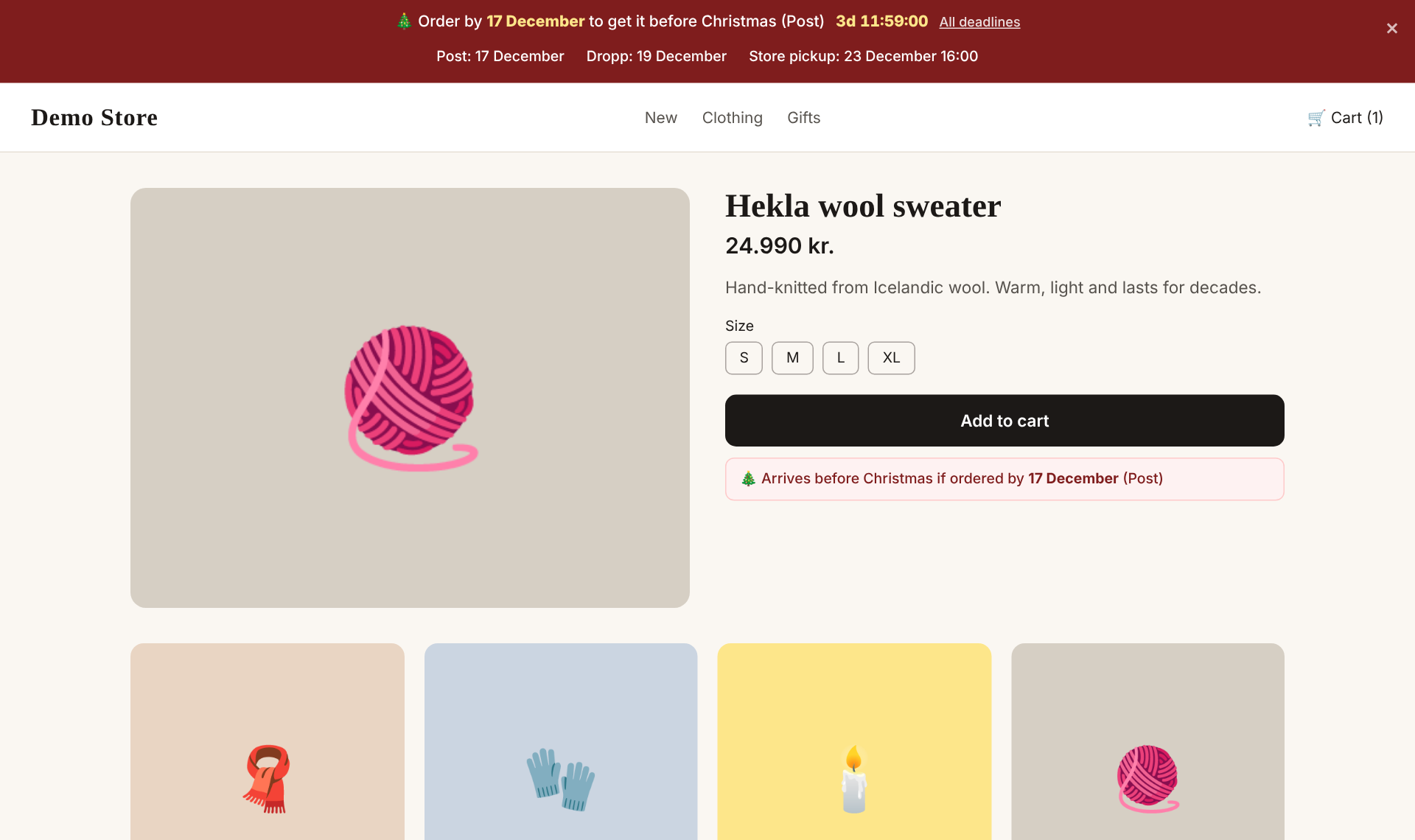
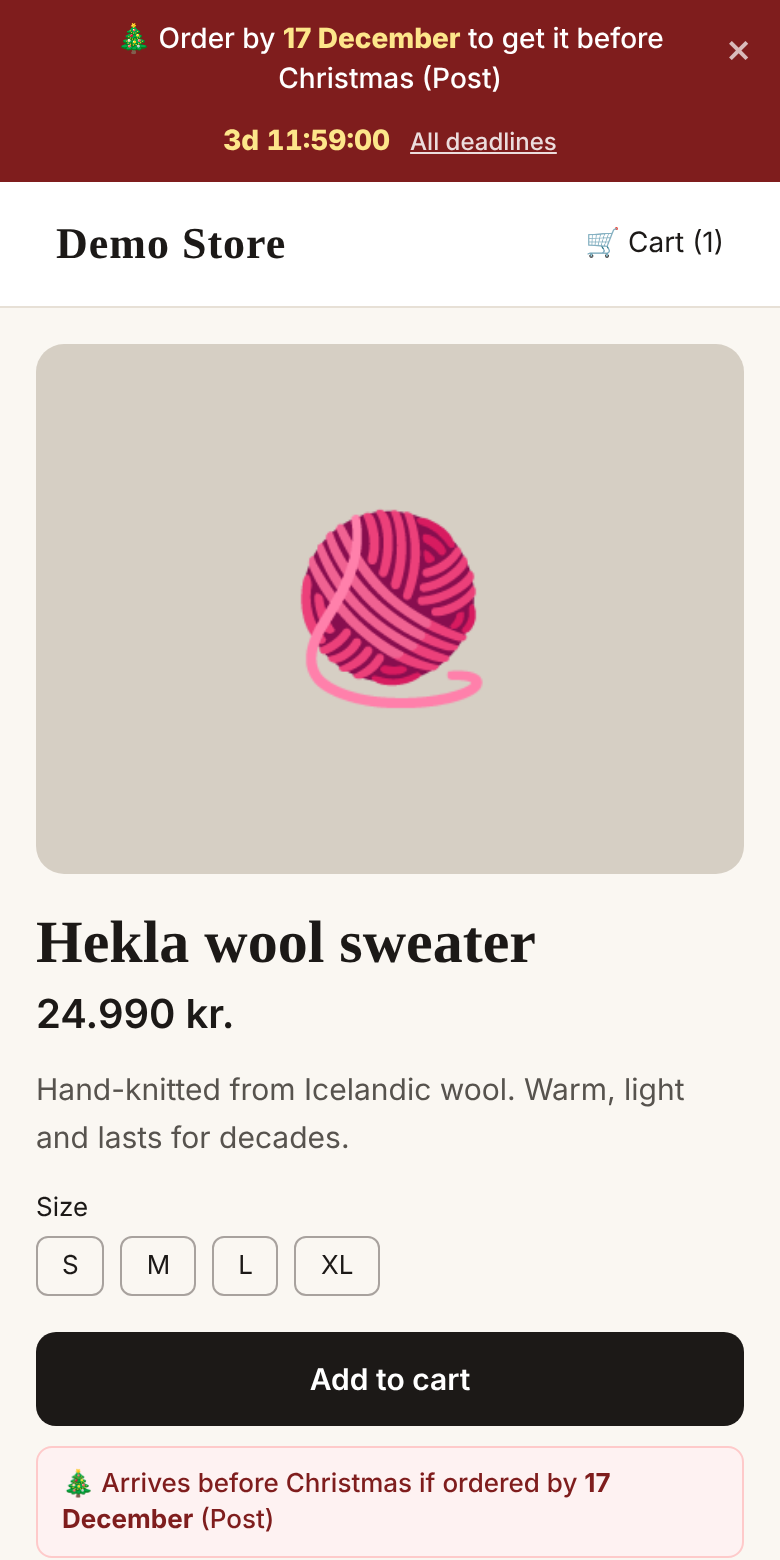
In December the most common question is: "Will it arrive before Christmas?" This add-on answers it before it's asked. The bar shows the last order date for each delivery method with a countdown and moves on to the next deadline by itself. A reminder appears next to the Add to cart button. People order earlier and you get fewer questions.
Completely free. No card, no invoice.
🌍 Works in every language of your store: Icelandic, English and Polish out of the box, add other languages in the dashboard.
🗓 Seasonal module: works in your store from 1 November to 26 December.
See it in action
Click All deadlines to see every delivery method.
What does it do?
Every delivery method
Pósturinn, Dropp, store pickup or whatever you offer. Each with its own deadline.
Countdown to the next deadline
Moves on to the next deadline by itself when one passes.
Reminder on the product
"Arrives before Christmas if ordered by 17 December" right next to Add to cart.
All deadlines in one place
Customers can open a list of all deadlines with one click.
Message after the last deadline
After the last deadline the bar shows a Christmas greeting or information about delivery after Christmas.
Completely free
No trial, no invoice, no company ID.
What you can configure
- ✓Delivery methods and their last order dates
- ✓Bar text
- ✓Reminder next to Add to cart (on/off and text)
- ✓Message after the last deadline
- ✓When the bar appears and disappears
- ✓Colours, mobile, stick to the top
Examples
Early December
"Order by 17 December to get it before Christmas" reminds customers that time is limited.
The last days
When the post deadline has passed, the bar points to Dropp or store pickup, so sales keep going.
Screenshots
Up and running in 3 minutes
- 1
Create an account and add your store.
- 2
Paste one line of code into your Shopify theme. Once, for all add-ons.
- 3
Activate the add-on and configure it. Changes appear instantly.
How to work out the last order date for Christmas with Pósturinn, Dropp and store pickup in Iceland, and where to show it so customers order in time.
Questions and answers
›Where do the dates come from?
You enter them yourself. We add suggestions, but check the correct dates with Pósturinn, Dropp etc.
›Does the reminder work with every theme?
Yes, it appears at the Add to cart form that all Shopify themes use.
Christmas delivery deadlines
Show the last order date for Christmas delivery with a countdown, in a bar and on every product. Completely free.
Completely free. No card, no invoice.
🌍 Works in every language of your store: Icelandic, English and Polish out of the box, add other languages in the dashboard.
🗓 Seasonal module: works in your store from 1 November to 26 December.
Other add-ons
Black Friday
Countdown, discount code and popup for Black Friday. Completely free.
Announcement bar
A bar at the top of your store with a message, link and countdown.
AI chat assistant
A chat assistant that knows your products and answers customers in their language (Icelandic, English, Polish and more), 24/7.
Discount popup for email signup
A popup that offers a discount in exchange for an email address. Grow your mailing list and get more first orders.
Free shipping bar
Shows how much is missing for free shipping, live from the cart. Raises the average order value.
Cookie consent banner
An Icelandic cookie consent banner that meets privacy rules and connects to Shopify. Completely free.
Back in stock alerts
Customers leave their email on sold-out products and get an email as soon as the product is back. No lost sales.
Gift wrapping
Customers choose gift wrapping and write a card message right in the cart. Everything appears on the order.
Prices in foreign currencies
Tourists see an approximate price in their own currency next to the ISK price. Rates updated daily.
Frequently bought together
Suggest products that go together, on the product page and in the cart. Higher average order value with no extra work.
Product labels
Sale, New, Sold out or Made in Iceland right on the product images. Shown automatically.
Trust badges and payment methods
Secure payment, returns and payment methods like Netgíró and Pei, right under the buy button. Completely free.
Text blocks
Put text in a chosen place in your store, only on the right products and at the right time. Without editing the theme.
Product comparison
Customers compare up to 4 products side by side: price, availability, variants and features.
Wishlist
Customers save products to a wishlist and share it, e.g. before Christmas.
Instant search
Search that shows products with images and prices as you type, even with typos.
Size chart
The right size chart on the right products, in cm and inches. Fewer returns.
Product personalisation
Engraving, a name or choices on the product page that go with the order, with a preview.
Contact button
WhatsApp, Messenger, phone and e-mail in one button in the corner of your store.
Icelandic occasions
A countdown bar for Bóndadagur, Konudagur, Mother's Day and more. Completely free.
Delivery
Delivery options, prices and the estimated delivery date on the product page, with a countdown to dispatch.
Vacation mode
A bar with your return date and dispatch day while you're on holiday, or closed for orders. Completely free.
Cart tab reminder
When a visitor with items in the cart switches tabs, the title becomes “(2) Your cart is waiting 🛒”. Completely free.
Business customers
Kennitala and company name in the cart, prices excluding VAT and a button to request a quote.
SEO
Return policy and shipping for Google, company details and a weekly SEO check.
Mega menu
A big, clear menu with collections, products, images and search. Without editing the theme.